
Active Reconnaissance
- Nmap
- Wireshark
- Assessment
Overview/Summary
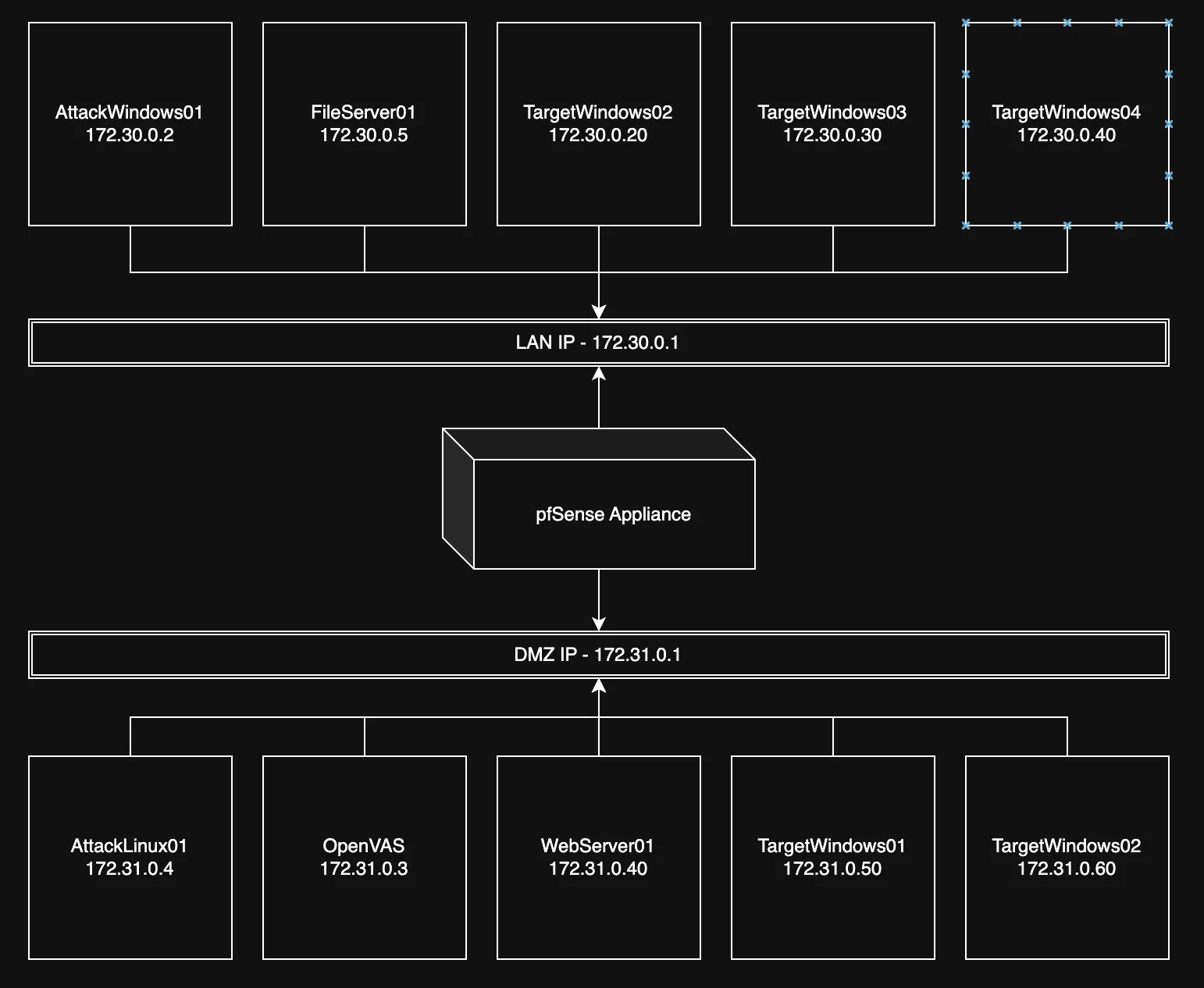
Using a simulated lab with multiple VMs set up as both attack and target OS.
I will be using NMAP (Zenmap Port Scanner) and Wireshark to perform Active Reconnaissance.
Key Concepts
Nmap
Network discovery and security auditing tool used to identify hosts, open ports, services, and operating system information.
Wireshark
Packet analyzer used to capture and inspect live network traffic. During active reconnaissance it validates what Nmap is actually putting on the wire — TCP flags, handshake completion, and service banners — so scan results can be corroborated against ground truth.
Investigation Process
Initial Steps
Using AttackWindows01 I performed and Nmap scan using Zenmap.
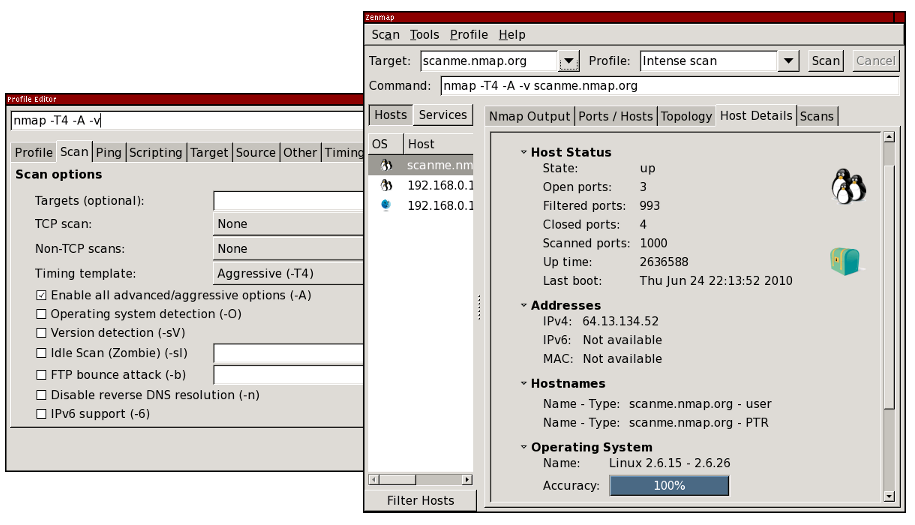
Zenmap provides different tabs that display scan profiles and their corresponding command-line equivalents, I also wrote a cheat sheet of nmap commands here
Commands Used
nmap -p <port number> <target>       # single port
nmap -p- <target>                    # full TCP range
nmap -sS -sV -O <target>             # SYN scan + service/version + OS fingerprint
nmap -sU --top-ports 20 <target>     # common UDP services
nmap -A -T4 <target>                 # aggressive scan (scripts, traceroute, versions)
In parallel, Wireshark was left capturing on the attacker interface with the display filter ip.addr == <target> so every probe Nmap sent could be observed live.
Observations
- Host discovery confirmed the target VMs were reachable across the LAN and DMZ segments shown in the topology.
- Open ports on the target matched expected services (e.g. 22/SSH, 80/HTTP, 445/SMB), and
-sVreturned accurate version banners. - Wireshark showed the classic SYN → SYN/ACK → RST pattern for
-sS, confirming the half-open behavior of a SYN scan versus a full connect scan. - Noise level was high: aggressive timing (
-T4,-A) produced a burst of traffic that would trivially trigger IDS signatures in a monitored environment.
Lessons Learned
- Active reconnaissance is loud by design — every probe is an artifact a defender can see. Scan profile and timing directly affect detectability.
- Cross-validating Nmap output with Wireshark builds trust in the results and helps spot filtered ports, rate limiting, or firewall rewrites that would otherwise be invisible in the Nmap summary.
- Small changes in flags (
-sSvs-sT,-T2vs-T4) meaningfully change both the accuracy of the result and the footprint left behind.
Takeaways
- Start narrow (host discovery, top ports) before going wide (
-p-,-A) to limit noise until it is justified. - Always pair the scanning tool with a packet capture when learning — it turns Nmap from a black box into an observable exchange.
- From a blue-team perspective, these same patterns (SYN sweeps, version probes, rapid sequential port hits from one source) are exactly what SOC detections should be watching for.
-work in progress